

Zuper integration with Zoho CRM workflow automation dashboard

Case Study: Zuper Integration With Zoho Inventory and Zoho Desk

Introduction

Zuper integration with Zoho helps service-based businesses unify field operations with customer management by connecting real-time job execution with CRM intelligence. For organizations managing technicians, work orders, and customer communication across multiple systems, integration becomes essential to eliminate manual work and improve service efficiency.

In this case study, we explore how BoostedCRM successfully implemented a custom integration between Zuper—a leading field service management platform—and Zoho CRM, enabling seamless data synchronization, automated workflows, realtime field notifications and insights and complete operational visibility.

Client Overview

The client is a fast-growing field service organization that manages a high volume of service requests, technician schedules, and customer follow-ups. Their teams relied on Zuper for field execution and job tracking, while Zoho CRM served as the central platform for customer data, sales coordination, and service history.

As operations expanded, the disconnect between Zuper and Zoho created inefficiencies. To streamline workflows and deliver faster customer service, the company partnered with BoostedCRM for a robust Zuper integration with Zoho.

Challenges

Before the integration, the client faced several operational roadblocks:

1. Disconnected Systems

Zuper and Zoho CRM operated independently, meaning job updates in the field were not reflected inside CRM records automatically.

2. Manual Data Entry

Staff had to manually copy work order details, technician updates, and customer notes between systems—wasting time and increasing errors.

3. Lack of Real-Time Visibility

Managers struggled to track service progress, technician status, and job completion updates from within Zoho CRM.

4. Slower Customer Response

Without synchronized workflows, customer communication and follow-ups were delayed, impacting service quality.

These challenges made it clear that a seamless Zuper integration with Zoho was critical for scaling operations efficiently.

The BoostedCRM Solution:

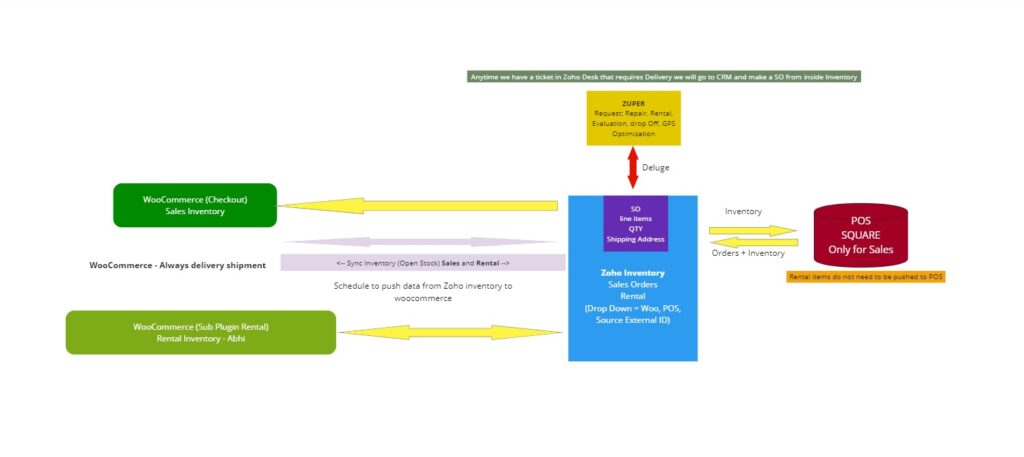
BoostedCRM developed and deployed a customized integration framework that connected Zuper with Zoho CRM through secure APIs and workflow automation.

✅ Centralized Work Order Sync

Work orders created in Zoho CRM were automatically pushed into Zuper, ensuring technicians received accurate job details instantly.

Case Study: Zuper Integration With Zoho Inventory And Zoho Desk | Boosted Crm

✅ Real-Time Field Updates in Zoho CRM

As technicians updated job status in Zuper (assigned, in progress, completed), those updates synced back into Zoho CRM automatically.

✅ Automated Customer Communication

Triggers were configured to send automated follow-ups and notifications based on service milestones—improving customer experience.

✅ Unified Customer and Service History

Zoho CRM records were enriched with service data from Zuper, giving teams a complete 360-degree customer view.

✅ Scalable Workflow Automation

The integration was built to scale with growing job volume and future enhancements like invoicing, inventory, and scheduling automation.

With this solution, the client achieved a powerful, end-to-end Zuper integration with Zoho that streamlined both office and field operations.

Results & Outcomes

After implementation, the client experienced measurable improvements:

✔ Reduced Manual Work

Administrative effort dropped significantly by eliminating duplicate data entry.

✔ Faster Job Execution

Technicians received real-time work orders and updates without delays.

✔ Improved Operational Visibility

Managers could track service progress directly inside Zoho CRM.

✔ Better Customer Satisfaction

Faster response times and automated follow-ups improved the overall service experience.

✔ Scalable System for Growth

The integration positioned the company for expansion without increasing operational complexity.

Key Takeaways

  • Integrating field service tools with CRM improves productivity.

  • Real-time synchronization reduces errors and delays.

  • Automation enables faster customer response and better coordination.

  • A strong Zuper integration with Zoho creates a scalable service foundation.

FAQs

1. What is Zuper integration with Zoho?

Zuper integration with Zoho connects the Zuper field service platform with Zoho CRM, allowing service data, work orders, and technician updates to sync automatically.

2. Why integrate Zuper with Zoho CRM?

Integrating Zuper with Zoho improves operational efficiency, reduces manual work, and provides real-time visibility into field service activities.

3. Can job status updates sync automatically?

Yes. With BoostedCRM’s integration, technician updates in Zuper instantly reflect inside Zoho CRM.

4. Does this integration improve customer experience?

Absolutely. Automated notifications, faster follow-ups, and accurate service tracking lead to better customer satisfaction.

5. Is the integration scalable for growing teams?

Yes. The solution is built to support increasing service volume and future workflow enhancements.

Conclusion

The Zuper integration with Zoho delivered by BoostedCRM transformed the client’s field service operations by bridging the gap between execution and customer management. Instead of relying on manual updates and disconnected platforms, the organization now benefits from real-time service tracking, automated workflows, and complete visibility inside Zoho CRM.

For any business managing technicians, work orders, and customer relationships at scale, integrating Zuper with Zoho can unlock major operational efficiency and elevate service delivery.

Looking to implement Zuper integration with Zoho?

BoostedCRM helps businesses automate work orders, sync technician updates in real time, and improve customer service through customized Zoho integrations.

Want to boost response rates? Get started with Zoho CRM and MessageMedia SMS integration in just a few clicks.

Connect with our experts today!

Share this post

Previous

Next